
On this page
- What is an FBA removal order?
- How to create a removal order
- Removal and disposal fees in 2026
- How long removal orders take
- Receiving removal boxes: what to check
- Claiming missing or damaged removal units
- Where customer returns fit
- The Amazon reports you'll use
- How Sellerfy handles removals
- Frequently asked questions
- Official Amazon sources
- Related
Key takeaways
- A removal order sends FBA inventory back to you; a disposal destroys, recycles or donates it; a liquidation sells it off Amazon.
- Fees are per unit, by size and weight, starting at $0.84 for small standard items (from Jan 15, 2026), and are now charged as each unit ships.
- Amazon can take 90+ days to process a removal, and one order often arrives as several boxes with separate tracking numbers.
- Removal claims are not automatic: count every box against what Amazon says it shipped, and file within the window.
What is an FBA removal order?
A removal order is a request for Amazon to take units out of its fulfillment centers. Sellers use it to get back unsellable returns, slow stock they would rather sell elsewhere, or units about to run up storage fees. There are three order types, and they show up as separate types in Amazon's removal reports:
- Return — Amazon ships the units to an address you choose, usually your warehouse, a prep center or a liquidation partner.
- Disposal — Amazon destroys, recycles or donates the units. Nothing comes back to you.
- Liquidation — Amazon sells the units to wholesale liquidators, who resell them outside Amazon. You get a net recovery value after a liquidation referral fee (15% of gross recovery in 2026) and a per-unit processing fee.
Customer returns are a related but different flow: a customer sends an item back to Amazon, Amazon grades it, and it goes back into sellable stock or becomes unfulfillable. Unfulfillable units sit in Amazon's warehouse until you remove or dispose of them — which is where removal orders come in.
How to create a removal order
In Seller Central the usual path is:
- Open your inventory. Menu → Inventory → Manage All Inventory (also labelled Manage FBA Inventory).
- Select the SKUs. Tick the listings you want back, then choose Action on selected → Create removal order.
- Choose the method. Pick Return to address or Dispose, and enter the quantity of sellable and unfulfillable units for each SKU.
- Review and place the order. Check the address and the estimated fee, then place it. Note the removal order ID — it is printed on the shipping labels and is how you match boxes later.
You can also start from the Recommended Removals report or the Remove Unfulfillable Inventory page. Amazon renames menus from time to time, so if a label has moved, search Seller Central for "removal order".
Automatic removals
Amazon lets you set automatic removal for unfulfillable units (in the Automated unfulfillable settings on the Remove Unfulfillable Inventory page) and for aged sellable inventory (under the FBA settings). The options are to return the units, dispose of them or, in some cases, liquidate them. If you set no preference, Amazon may dispose of unfulfillable units on its own, so it is worth choosing a default.
Removal and disposal fees in 2026
Removal and disposal share one per-unit rate card based on size tier and shipping weight. These rates took effect on January 15, 2026; the only change from 2025 was a cheaper lightest standard tier ($1.04 → $0.84).
| Size tier | Shipping weight | Fee per unit |
|---|---|---|
| Standard | 0–0.5 lb | $0.84 |
| Standard | 0.5–1 lb | $1.53 |
| Standard | 1–2 lb | $2.27 |
| Standard | Over 2 lb | $2.89 + $1.06/lb over 2 lb |
| Large bulky, extra-large & special handling | 0–1 lb | $3.12 |
| Large bulky, extra-large & special handling | 1–2 lb | $4.30 |
| Large bulky, extra-large & special handling | 2–4 lb | $6.36 |
| Large bulky, extra-large & special handling | 4–10 lb | $10.04 |
| Large bulky, extra-large & special handling | Over 10 lb | $14.32 + $1.06/lb over 10 lb |
Special handling covers apparel, shoes, watches, jewelry and dangerous goods. Want a number for a specific order? Use the removal order fee calculator.
How long removal orders take
Amazon's own guidance is that a removal order can take 90 days or more to be processed and leave the fulfillment center, plus about two weeks for the carrier to deliver. Many orders move much faster — sellers often see boxes within a few weeks — but removals are low priority, handled first-in-first-out behind customer orders, and can't be expedited. You can cancel an order only while its status is Pending.
Two things surprise most sellers:
- One order, many boxes. A single removal order is often split into several packages, sometimes from different fulfillment centers and on different days. Each package has its own tracking number, usually UPS or Amazon Logistics; very large orders can come by freight.
- The order can "complete" before everything arrives. Amazon marks units as shipped when they leave the building. Whether they reach you is a separate question you have to answer box by box.
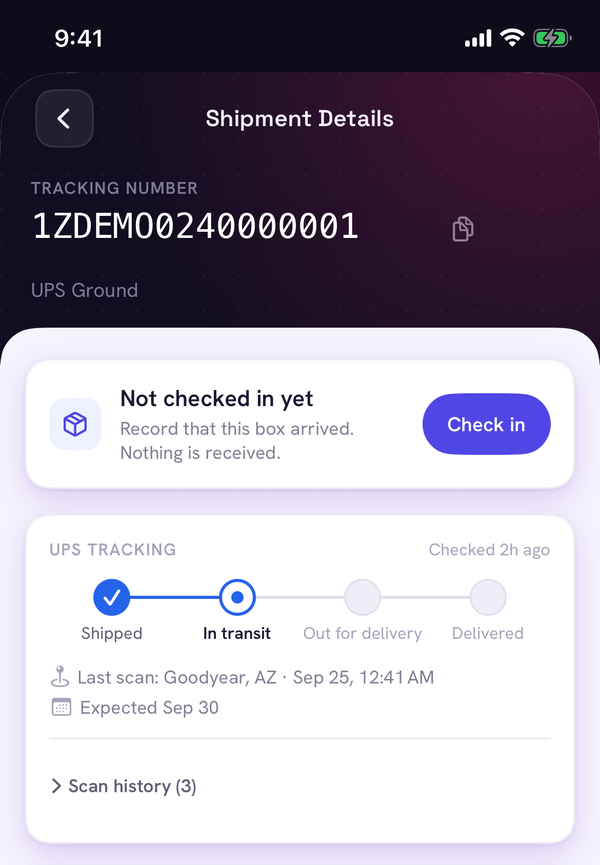
The Removal Shipment Detail report (Reports → Fulfillment → Removals) lists every shipped package with the SKU, quantity, carrier and tracking number. That report is the source of truth for what Amazon says it sent you.
Receiving removal boxes: what to check
Most missing-unit money is lost at the dock, not at Amazon. Build a routine for every removal box:
- Match the box to its order. Scan or type the tracking number and find the removal order it belongs to. Log the box as received with the date.
- Photograph before opening. Take photos of the sealed box and the label, especially if it looks crushed, wet or re-taped.
- Count every unit against the shipped quantity. Compare what's inside with the shipped-quantity for that SKU and tracking number, not with what you ordered.
- Check condition. Note units that arrive damaged, open or wrong (a different SKU or FNSKU), with photos.
- Record shortages immediately. Write down expected vs received per SKU for that box, while the evidence is still on the table.
Track every removal box. Start free.
7-day free trial, no credit card. See every shipment's live carrier status and box count.
This is the step spreadsheets make painful: one order across five boxes, arriving over two weeks, with quantities split across packages. A tool that knows which units each tracking number should contain turns it into a scan-and-count job.
Claiming missing or damaged removal units
Amazon's automatic reimbursements (introduced in November 2024) cover many warehouse and customer-return cases — but not removal orders. If a removal box never arrives, or arrives short or damaged, you have to open the claim yourself.
| What happened | When to file |
|---|---|
| Items lost in transit (never arrived) | No sooner than 15 days after the shipment's last tracking movement, and no later than 75 days after the shipment was created |
| Items damaged in transit, or a grading dispute | As soon as they arrive, and within 60 days of delivery |
A strong claim includes the removal order ID, the tracking number and proof of delivery, the expected vs received quantity per SKU, and photos of the box and any damaged units. A lost-in-transit claim filed too early — less than 15 days after the package last moved — is rejected, so track the dates.
Where customer returns fit
Customers generally have 30 days from delivery to return most items to Amazon. When a return comes back, Amazon records a disposition. Sellable units go back into stock; unsellable ones are marked for example customer damaged, defective, carrier damaged or damaged (by Amazon's warehouse). Amazon reimburses warehouse and carrier damage; customer damage and defects are not reimbursed.
If a customer is refunded but never sends the item back, Amazon is meant to reimburse you automatically. If that doesn't happen, sellers in the US can file within 60–120 days after the refund. Unsellable returns then sit in your unfulfillable inventory until you create a removal or disposal order — closing the loop back to the start of this guide.
The Amazon reports you'll use
- Removal Order Detail — one row per SKU per order: order type, status, requested, shipped, disposed and cancelled quantities, and the removal fee.
- Removal Shipment Detail — one row per shipped package and SKU: shipment date, shipped quantity, carrier and tracking number.
- FBA Customer Returns — each return with its date, reason, disposition and license plate number (LPN).
Joining the shipment report to what physically arrives, box by box, is the whole job. That's exactly what Sellerfy automates.
How Sellerfy handles removals
Sellerfy pulls your removal orders and shipments from Amazon and turns them into a list of boxes, each with live carrier tracking. Your team checks boxes in by scanning the label on the iOS app, unboxes and counts or scans units, and Sellerfy compares every box with what Amazon says it shipped. When units are missing, it drafts the claim with the quantities and evidence attached — and there's no commission on what you recover.
See how FBA returns and removal management works in Sellerfy →
Frequently asked questions
How long does an Amazon FBA removal order take?
Amazon says a removal order can take 90 days or more to be processed and leave the fulfillment center, plus about two weeks for the carrier to deliver. Many orders arrive much sooner, but removals are processed first-in-first-out behind customer orders and can't be expedited.
How much does an FBA removal order cost?
Removal and disposal share one per-unit fee based on size tier and shipping weight. For standard-size items it starts at $0.84 per unit (0–0.5 lb) as of January 15, 2026. Since March 1, 2026 the fee is charged as each unit is removed rather than when the whole order completes.
What is the difference between removal, disposal and liquidation?
A removal order returns units to an address you choose. A disposal order has Amazon destroy, recycle or donate them. A liquidation order sells them to wholesale liquidators, who resell them off Amazon; you receive a net recovery value after fees.
Does Amazon automatically reimburse missing removal units?
No. Automatic reimbursement that started in November 2024 covers warehouse and customer-return cases, but removal order claims still have to be filed by the seller.
How long do I have to file a claim for a removal order?
For items lost in transit, Amazon accepts the claim no sooner than 15 days after the removal shipment's last confirmed tracking movement and no later than 75 days after the shipment was created. For items damaged in transit, or a grading dispute, you can file as soon as the items arrive and within 60 days of delivery.
Why did my removal order arrive in several boxes?
Amazon often ships one removal order as several packages, sometimes from different fulfillment centers and on different days, each with its own tracking number. The Removal Shipment Detail report lists the carrier and tracking number for each package.
Can I cancel an FBA removal order?
Only while its status is Pending. Once Amazon starts processing it, it can't be cancelled.
Official Amazon sources
US marketplace guidance. Seller Central sign-in may be required. Check the linked policy for current eligibility and requirements.